.webp)
Learn how to smoothly handle ecommerce site migration in 2025 with our easy guide. Find steps for re-platforming, key tips, and how to optimize after the switch.Migrating your ecommerce site can feel like a big step, but it’s one that can seriously level up your business.
Whether you're switching platforms for better features or just giving your current site a fresh start, a smooth transition is key to keeping your sales and customer experience on track.
In this post, we’ll walk you through the essential steps of ecommerce site migration, so you can feel confident about making the move and setting your store up for even greater success. Let’s dive in!
In simple words, e-commerce site migration is moving your online store from one platform to another. It could be a small-scale transfer, like switching from one SaaS e-commerce platform to another, or a full re-platforming, where your site’s entire structure, data, and functionalities are transferred.
It’s not just about changing your website's look and feel; this process involves moving product data, customer information, order history, and much more.
One thing to keep in mind is that migrations aren’t just about aesthetics or functionality; it’s also about improving performance, security, and scalability.
Whether you're moving away from an outdated system or upgrading to a modern platform, the decision to migrate is crucial for growth.
So, why should you go through an ecommerce site migration? There are several convincing reasons that will make re-platforming essential for your business growth.
As your business expands, your current platform might struggle to keep up with the growing customer base and rising traffic.
When website performance starts to suffer from issues like slow loading times or even crashes during peak shopping periods, it's a clear sign that your platform is no longer cutting it.
Older platforms often lack the modern tools and connections needed to compete in today’s fast e-commerce world. Newer platforms offer many built-in features, like easy-to-use templates, detailed analytics, and mobile-friendly designs.
They also provide integrations with popular tools such as Shopify, WooCommerce, and BigCommerce. This means you can easily connect with payment systems, manage your inventory, and automate your marketing. These features help simplify your business processes and improve the customer experience, making it easier to attract and keep customers.
Outdated platforms can pose significant security risks. As technology evolves, so do cyber threats, and older systems are often more vulnerable to attacks. Without the latest security updates, your customer's data is at risk, which can severely damage your business reputation.
Older platforms often require constant maintenance and patching, which can be both time-consuming and expensive. Upgrading to a newer system reduces these ongoing costs, allowing you to focus more on growth and less on troubleshooting.
When these challenges start affecting your business’s performance and profitability, it’s time to consider ecommerce re-platforming to stay competitive and secure long-term growth.
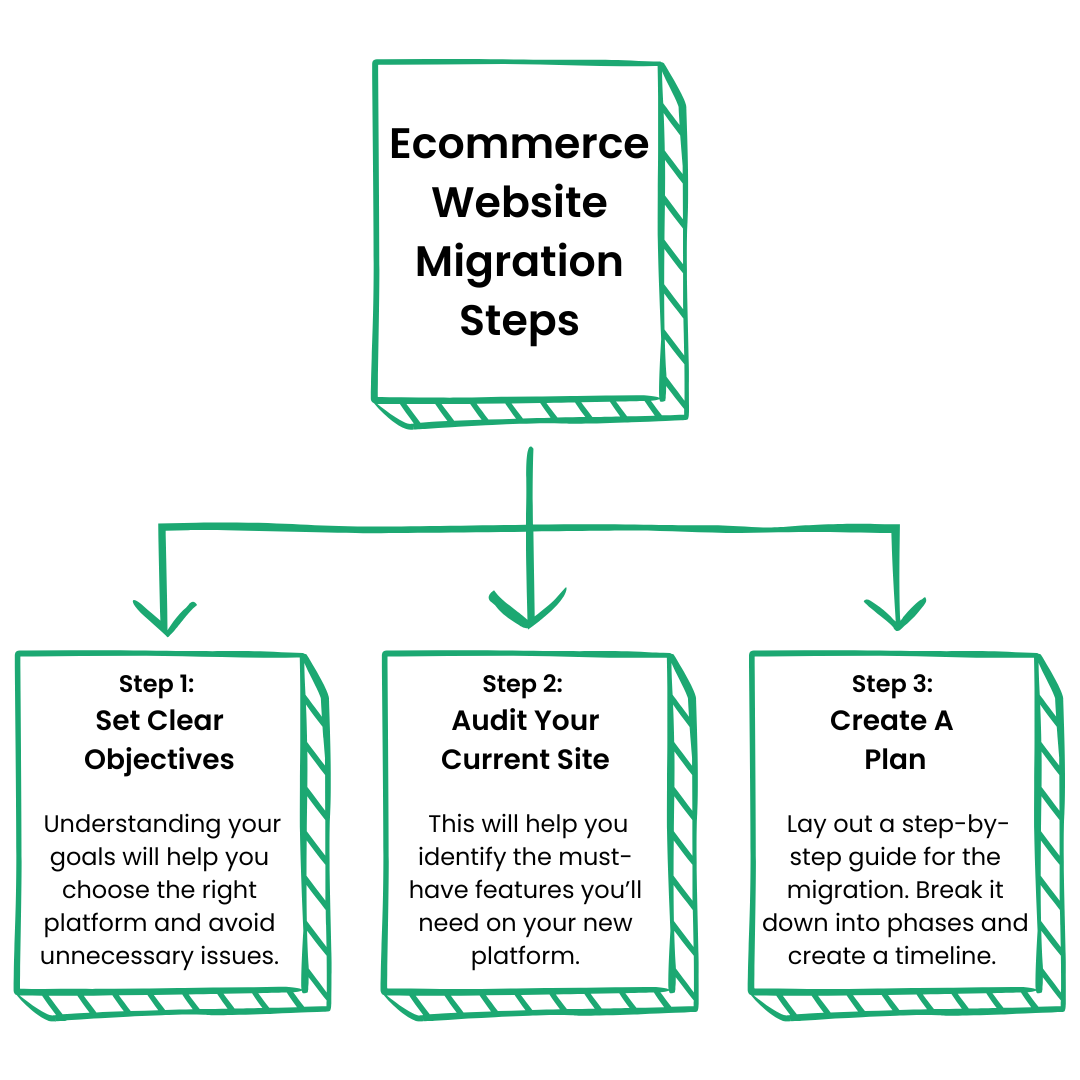
A well-thought-out plan is the backbone of a successful migration. Here are the steps to follow:
Step 1: Set Clear Objectives
Start by outlining exactly what you hope to achieve with your migration. Are you looking for faster load times, better customer experience, or more integrations? Understanding your goals will help you choose the right platform and avoid unnecessary issues during the migration process.
Step 2: Audit Your Existing Site
Analyze your current site for any shortcomings. What features are you missing? What areas can be improved? This audit will help you identify the must-have features you’ll need on your new platform.
Step 3: Create a Migration Plan
Lay out a step-by-step guide for the migration. Break it down into phases and create a timeline. Assign specific tasks to team members, and be sure to leave room for unexpected challenges. A well-documented plan will help prevent errors and confusion down the line.
Choosing the right platform for your ecommerce migration is key. Each platform has its strengths and weaknesses, and what works for one business might not work for another. Here are some common options:
These are fully hosted solutions where everything is managed for you. They’re a great choice for businesses that don’t want to handle technical aspects like security and updates themselves.
Examples include Shopify and BigCommerce. SaaS platforms are popular for small to medium businesses due to their simplicity and lower cost.
These are more customizable and allow you to adjust your ecommerce site to your specific needs. However, they require more involvement from your technical team. AWS and Azure are common examples of cloud-based platforms.
This is where things get more advanced. Headless platforms separate your website's front-end and back-end, giving you greater flexibility in design and functionality. These platforms are often used by large enterprises that need a more altered solution, like SAP Commerce Cloud or Salesforce Commerce Cloud.
On-premise platforms give you full control over your data and infrastructure but come with higher upfront costs and technical maintenance. These are generally used by larger companies that require custom solutions.
Having a detailed checklist is important for a smooth and successful e-commerce site migration. This checklist will be helping you stay organized and avoid important oversights during your re-platforming project.
✔ Backup Your Data: Always start by creating a full backup of your existing site. This ensures you have a copy of your data if anything goes wrong. A solid backup plan gives you peace of mind, knowing you can recover your information if needed.
✔ Data Cleansing: Clean up your data by removing outdated, irrelevant, or duplicate information. This makes the migration faster and reduces the amount of data you need to transfer. A clean dataset also helps your new platform run better and stay organized.
✔ Test Migration: Run a test migration with a small sample of data first. This helps you find potential issues, like data errors, without risking the entire migration. Testing also makes the overall process smoother, ensuring everything is ready for the full migration.
✔ Redirects: Set up proper 301 redirects to link old URLs to the new ones. This helps search engines and customers find your pages easily, maintaining your site’s visibility.
✔ Launch and Monitor: After launching, keep a close eye on your site’s performance. Check for issues like slow loading times or broken links. Monitoring right after launch is crucial to catch and fix any problems quickly.
Once your eCommerce migration is complete, the real work begins. Fine-tuning your new platform is essential for maximizing its potential and refining the user experience.
No migration process is without its challenges. However, being aware of potential obstacles ahead of time will make things a lot smoother.
One of the biggest hurdles is transferring data accurately. Product listings, customer accounts, order histories, and user information all need to move seamlessly.
Any error in this process can cause a lot of headaches. Imagine losing customer data or finding that half of your products didn’t make the switch.
Migrating your ecommerce site can disrupt your SEO efforts. Changes to your site’s structure, URLs, and metadata can cause a temporary dip in search engine rankings if not handled carefully.
To protect your rankings, you’ll need to put proper redirects in place and ensure there’s no loss of backlinks or broken links during the process.
If your current site relies on custom-built integrations, moving to a new platform can be tricky. For example, if you use a custom integration with a payment processor like Stripe, you need to ensure that this integration works smoothly on the new system. It’s essential to check that all third-party tools and integrations, such as email marketing services like Mailchimp or CRM systems like Salesforce, function as well on the new platform as they did on the old one.
Every minute of downtime equals lost sales. While re-platforming is essential for growth, it can also be risky if it interrupts business. Proper planning is crucial to ensure that the migration happens during low-traffic times and doesn't affect daily operations.
For B2B businesses, e-commerce re-platforming can present unique challenges. These companies often manage larger catalogues, complex pricing models, and specialized workflows.
When choosing a new platform, it's crucial to ensure it includes custom pricing options, as most B2B businesses do not have fixed prices. The platform should also be capable of handling bulk orders efficiently.
Additionally, integrations are essential for B2B companies, which typically use various software tools, such as CRMs and ERP systems. Ensuring smooth integration with these tools is a must for a successful transition.
1. How long does an eCommerce site migration typically take?
The timeline varies by site size and complexity. Small to mid-sized businesses usually take 1-3 months, while larger sites may need 3-8 months. Proper planning and testing are essential to avoid delays.
2. Is it necessary to hire an expert for the migration process?
While it’s not mandatory, hiring an expert can help streamline the migration process, reduce errors, and ensure best practices are followed. Their experience can save you time and prevent costly mistakes.
3. Are there any hidden costs of eCommerce re-platforming?
Hidden costs may include data migration fees, third-party integrations, team training, ongoing maintenance, and potential downtime. Additionally, budget for new marketing campaigns to recover any lost traffic or sales.
Migrating your ecommerce site is an extensive process, but it’s also an opportunity to set your business up for future success. With the right planning and preparation, your ecommerce re-platforming process can be smooth and efficient.
Even though this ecommerce site migration guide explains each and every step in detail, we understand the process can be too technical or complex for someone with no prior experience. But don't worry, we're here to help! DIGITORM has a team of website development experts who can take care of this task for you. Schedule a free consultation with us today to discuss your project!
Discover why mobile marketing should be your top priority in 2025. Learn about the latest trends, from in-app ads to 5G, and how Digitorm can help you stay ahead!







.jpeg)
